
Scroll Down

Start Sending Lab Cases

Easy steps to start working with Australian Dental Labs – Fast, Reliable, Australian Made

How It Works

Start sending cases in 6 simple steps

Here's exactly what the process looks like.

1

Complete this form:

Tell us about your practice and we'll get you set up to send your first case.

* indicates required
Clinic & Contact
e.g. Principal Dentist, Practice Manager
Enter the same email as above if accounts and clinical are handled by the same person.
Scanner & Workflow
Only fill this in if you selected "Other" above.
Practice Address
Suite, level or building — optional.

Now you can move on to step 2.

2

Connect your scanner

Set up your intraoral scanner to integrate with Australian Dental Labs. Compatible with all major platforms — 3Shape TRIOS, iTero, MEDIT, CEREC, Allied Star, Dexis and more.

↓ Click for scanner setup guides
3

Take scans of your patient

Scan your patient as you normally would. No changes to your clinical workflow — just scan and move on.

4

Add your prescription & send

Within your scanner software, add your case requirements and required delivery date. Select Australian Dental Labs as your dental lab, then submit. The scan and prescription come straight to us.

5

We receive your scan

Your case lands in our system immediately. We review the scan and prescription, confirm all details, and queue your case for production.

6

We begin production

Our technicians get to work. Right first time — no back-and-forth, no delays. Manufactured in-house and dispatched on schedule.

Have questions or need help?

Our team is here to help you. 

Phone: 1300 849 229

OR

Seamless Integration with All Major Intraoral Scanners

At Australian Dental Labs, we’re fully compatible with all leading digital scanning platforms—3Shape TRIOS, iTero, MEDIT, CEREC, Allied Star, Dexis, and more. No matter your scanner, connecting with us is fast, simple, and hassle-free.


3shape logo
Connecting with Trios

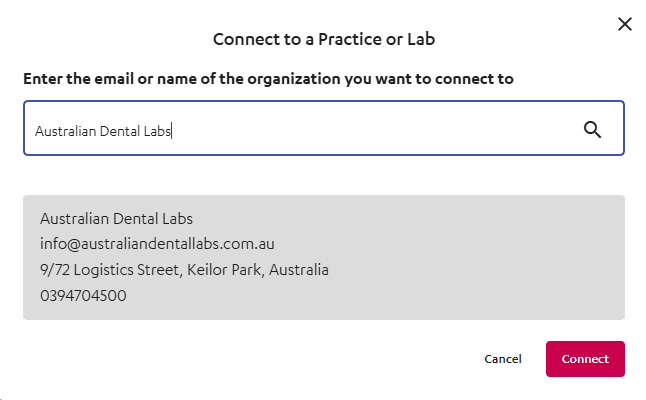
Connecting with a 3Shape Trios scanner is very easy and can be done by both the Clinician or the Lab. Once logged into your account, you can select the Connections tab at the top of the page. Search for our company name, Australian Dental Labs or email: [email protected]

Connecting with Trios


iTero
Connecting with iTero

The easiest way to make the connection is by calling your iTero provider and quoting either our company name, Australian Dental Labs or our email: [email protected]


MEDIT link
Connecting with MEDIT

Connecting with a MEDIT scanner is very easy and can be done by both the Clinician or the Lab. Once logged into you account you can select the Partners tab on the left side of the page. Search for our company name, Australian Dental Labs or email: [email protected]
partners
Alliedstar
Connecting with Alliedstar – AS Connect

Once logged into your account select the My Partner tab on the left. Search for our company name, Australian Dental Labs or email: [email protected]
My parther

DEXIS is Connect
Connecting with DEXIS

Once logged into your account select the Quick Connect tab on the top right. Search for our company name Australian Dental Labs


DEXIS

Dentsply Sirona
Connecting with CEREC

Once logged into your account select the Customers tab on the left. Search for our company name Australian Dental Labs or email: [email protected]